

 Звук исчез после обновления Debian Linux до версии 12.
Все необходимые пакеты установлены и переустановлены:
# aptitude search pipewire\|pulseaudio|grep 'i '
i  gstreamer1.0-pulseaudio - GStreamer plugin for PulseAudio (transitional package)
i A libkf5pulseaudioqt3 - Pulseaudio bindings library for Qt
i A libpipewire-0.3-0 - служба для обработки аудио и видео в реальном времени — библиотеки
i A libpipewire-0.3-common - libraries for the PipeWire multimedia server - common files
i A libpipewire-0.3-modules - libraries for the PipeWire multimedia server - modules
i A pipewire - служба для обработки аудио и видео в реальном времени
i A pipewire-bin - служба для обработки аудио и видео в реальном времени — утилиты
i A pipewire-pulse - PipeWire PulseAudio daemon
i  pulseaudio - звуковой сервер PulseAudio
i  pulseaudio-module-bluetooth - Bluetooth module for PulseAudio sound server
i A pulseaudio-utils - инструменты командной строки для звукового сервера PulseAudio
i A xfce4-pulseaudio-plugin - Xfce4 panel plugin to control pulseaudio
Оборудование тоже всё на месте и в рабочем состоянии:
$ lspci | grep Audio
00:1b.0 Audio device: Intel Corporation NM10/ICH7 Family High Definition Audio Controller (rev 01)


$ aplay -L
null
    Discard all samples (playback) or generate zero samples (capture)
default
    Playback/recording through the PulseAudio sound server
lavrate
    Rate Converter Plugin Using Libav/FFmpeg Library
samplerate
    Rate Converter Plugin Using Samplerate Library
speexrate
    Rate Converter Plugin Using Speex Resampler
jack
    JACK Audio Connection Kit
oss
    Open Sound System
pulse
    PulseAudio Sound Server
speex
    Plugin using Speex DSP (resample, agc, denoise, echo, dereverb)
upmix
    Plugin for channel upmix (4,6,8)
vdownmix
    Plugin for channel downmix (stereo) with a simple spacialization
hw:CARD=Intel,DEV=0
    HDA Intel, ALC888 Analog
    Direct hardware device without any conversions
plughw:CARD=Intel,DEV=0
    HDA Intel, ALC888 Analog
    Hardware device with all software conversions
sysdefault:CARD=Intel
    HDA Intel, ALC888 Analog
    Default Audio Device
front:CARD=Intel,DEV=0
    HDA Intel, ALC888 Analog
    Front output / input
surround21:CARD=Intel,DEV=0
    HDA Intel, ALC888 Analog
    2.1 Surround output to Front and Subwoofer speakers
surround40:CARD=Intel,DEV=0
    HDA Intel, ALC888 Analog
    4.0 Surround output to Front and Rear speakers
surround41:CARD=Intel,DEV=0
    HDA Intel, ALC888 Analog
    4.1 Surround output to Front, Rear and Subwoofer speakers
surround50:CARD=Intel,DEV=0
    HDA Intel, ALC888 Analog
    5.0 Surround output to Front, Center and Rear speakers
surround51:CARD=Intel,DEV=0
    HDA Intel, ALC888 Analog
    5.1 Surround output to Front, Center, Rear and Subwoofer speakers
surround71:CARD=Intel,DEV=0
    HDA Intel, ALC888 Analog
    7.1 Surround output to Front, Center, Side, Rear and Woofer speakers
dmix:CARD=Intel,DEV=0
    HDA Intel, ALC888 Analog
    Direct sample mixing device
usbstream:CARD=Intel
    HDA Intel
    USB Stream Output


$ aplay -l
**** List of PLAYBACK Hardware Devices ****
card 0: Intel [HDA Intel], device 0: ALC888 Analog [ALC888 Analog]
  Subdevices: 1/1
  Subdevice #0: subdevice #0


# sudo alsa-info
# less /tmp/alsa-info.txt.APHFwYdDYj


# cat /proc/asound/devices
  1:        : sequencer
  2: [ 0- 0]: digital audio playback
  3: [ 0- 0]: digital audio capture
  4: [ 0- 2]: digital audio capture
  5: [ 0- 0]: hardware dependent
  6: [ 0]   : control
 33:        : timer
Но аудио звука упорно нет и долго никто не мог найти причину ;(
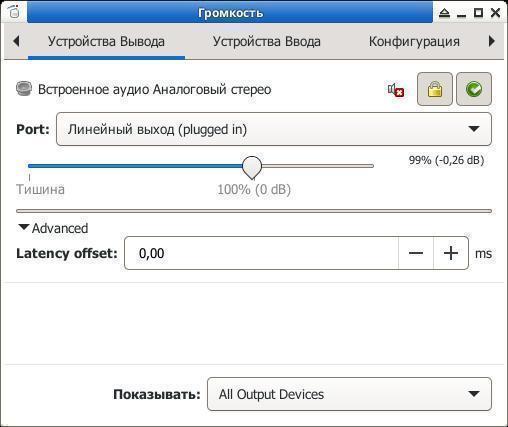
Печатаем в терминале pavucontrol или pavucontrol-qt или Приложения -> Настройки -> Регулятор громкости PulseAudio и проверяем настройки на вкладках Устройство ввода и Конфигурация:
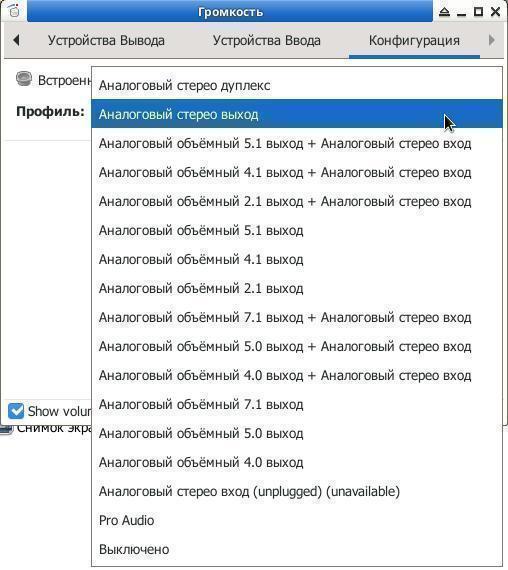
На вкладке Конфигурация по-неизвестным причинам было Выключено, меняем на Аналоговый стерео выход и получаем снова рабочий звук :)


